

SolutionVerifiable business automation
Automate smarter.
Prove it works.
How far can complex work really be automated?
Momenti has proven it in real operations.
Approach
We separate where AI is needed from where it isn’t
AI interprets documents and questions, while rule and optimization engines handle pass/fail judgments and placement.
Each technology takes only the role it needs, and a person makes the final decision.

Lineup
Business automation proven across 5 Solutions
We applied the same principle across five different business domains.
Click each solution to see its field and how it's verified.
05. Manufacturing Inspection
Q-READ
It extracts inspection-threshold candidates from approved drawings,
and an inspector approves them with evidence locations.

Evidence-based AI consultation · Momenti AICC
In finance, debt collection, telecom, and public services, even a small answer error can turn into a compliance risk.
Momenti AICC first verifies whether trustworthy evidence exists before generating a response.
Key features

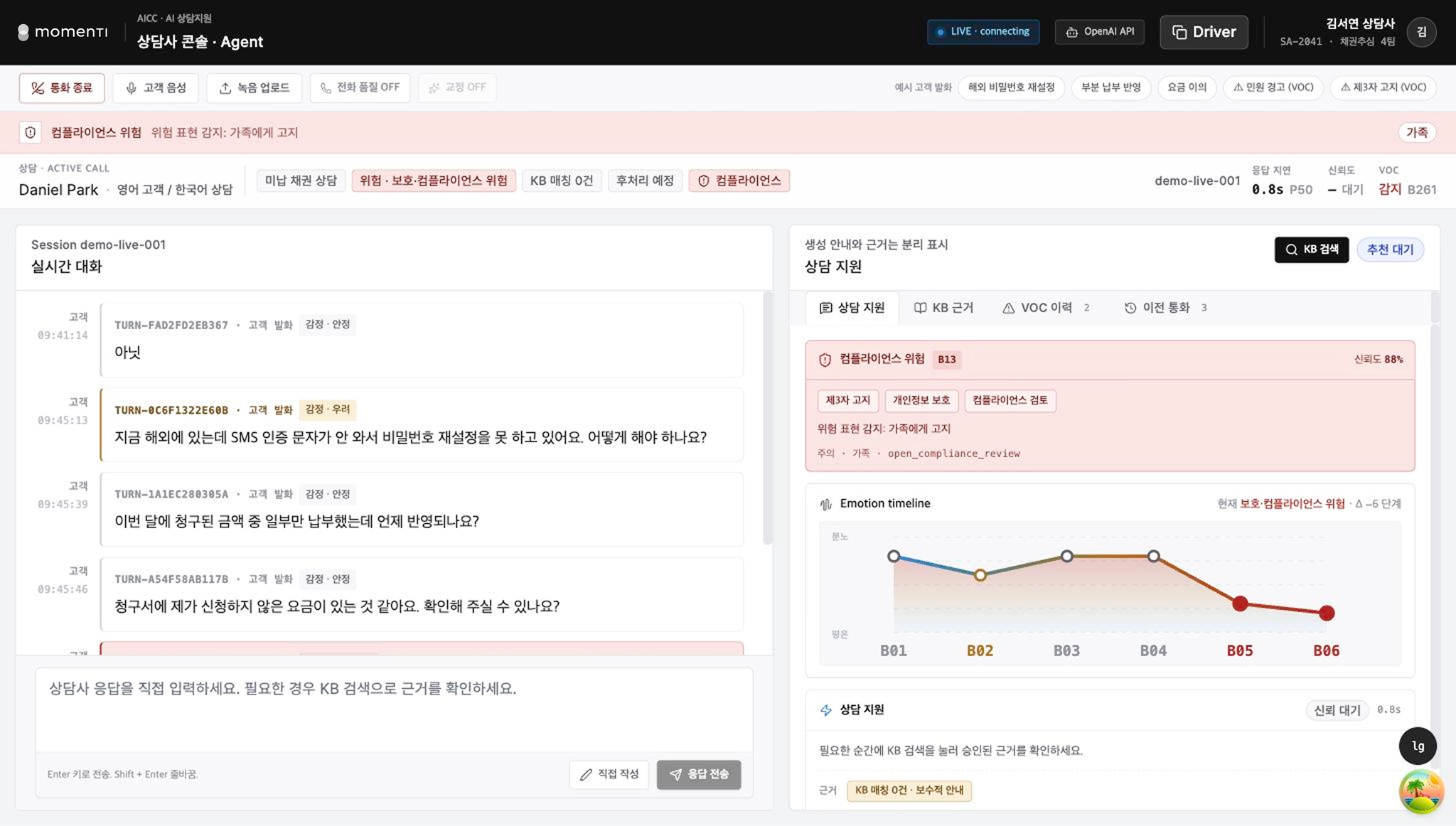
Agent console
Real-time STT with support info, KB evidence · VOC · past calls in
one view; English speech is shown with both original and translation

Admin console
Live consultations, VOC, Auto QA results, KB search status and metrics;
on risk detection: real-time listening · coaching · supervisor connect

Completed calls
After a call ends, its inquiry · content · status · summary auto-organize;
summaries link to the actual speech for side-by-side comparison

Auto QA
Applies the same evaluation criteria to every call and shows
per-item results down to the reason for each deduction.

Knowledge base management
See how parsing · chunking · indexing feed into search, and compare
before/after search results whenever knowledge is edited

STT domain correction
Corrects term-recognition errors from a dictionary, managing
and applying company-specific terms without retraining
Suitable for environments like these
1. Finance · debt-collection work where the consultation itself carries regulatory risk
2. Telecom · public contact centers that must convey rules and terms precisely
3. Environments that require multilingual consultation
4. Organizations extending sample QA into automated evaluation of all consultations
5. Environments where call data is hard to send to external services
General generative AI vs Momenti AICC
Before generating a consultation answer, Momenti AICC
first checks whether it has evidence it can answer from
General generative AI — answer first

Generates an answer the moment it receives a question
Outputs fluent sentences even when evidence is insufficient
The agent has to re-check the rules afterward
Momenti AICC — evidence first

First searches the knowledge base for evidence
Proposes an answer only when the evidence is sufficient
Presents the evidence used along with its source location
AICC evidence-gate · 4-layer separation structure
Search is done by the system, judgment by the gate, and assertion only when evidence exists.
L1. Search
Collects candidate evidence from rules · terms · manuals
L2. Judgment gate
Judges whether the results sufficiently support an answer
L3. Answer handling
Proposes the answer · shows the evidence used
Limits auto-input · gives conservative default guidance (no assertion)
L4. Evidence display
The agent checks the evidence used and its source location on-screen
* Each answer includes the evidence used and its source location, so the agent can verify it directly.
Processing-path division structure
The rule engine judges fixed criteria, while evidence-based AI supports only the areas that need interpretation.
Type
Processing area
Processing principle
Path A
Rule engine
Areas with clear criteria
Judgment · guidance by rules
Processed by predefined criteria; identical conditions yield consistent results
Path B
Evidence-based AI
Areas that need interpretation
Unstructured inquiries · summary · translation
Proposes only when verifiable evidence exists,
and gives conservative guidance when evidence is insufficient
* Fixed judgments that directly affect compliance are handled by the rule engine, not left to the LLM.
An integrated control solution that analyzes complex layout conditions
and proposes the optimal layout with the evidence behind it
Ship block layout must weigh many conditions together — size, equipment, schedule, and delivery.
Relying on experience and spreadsheets alone makes consistent layout standards hard to keep.
Key features

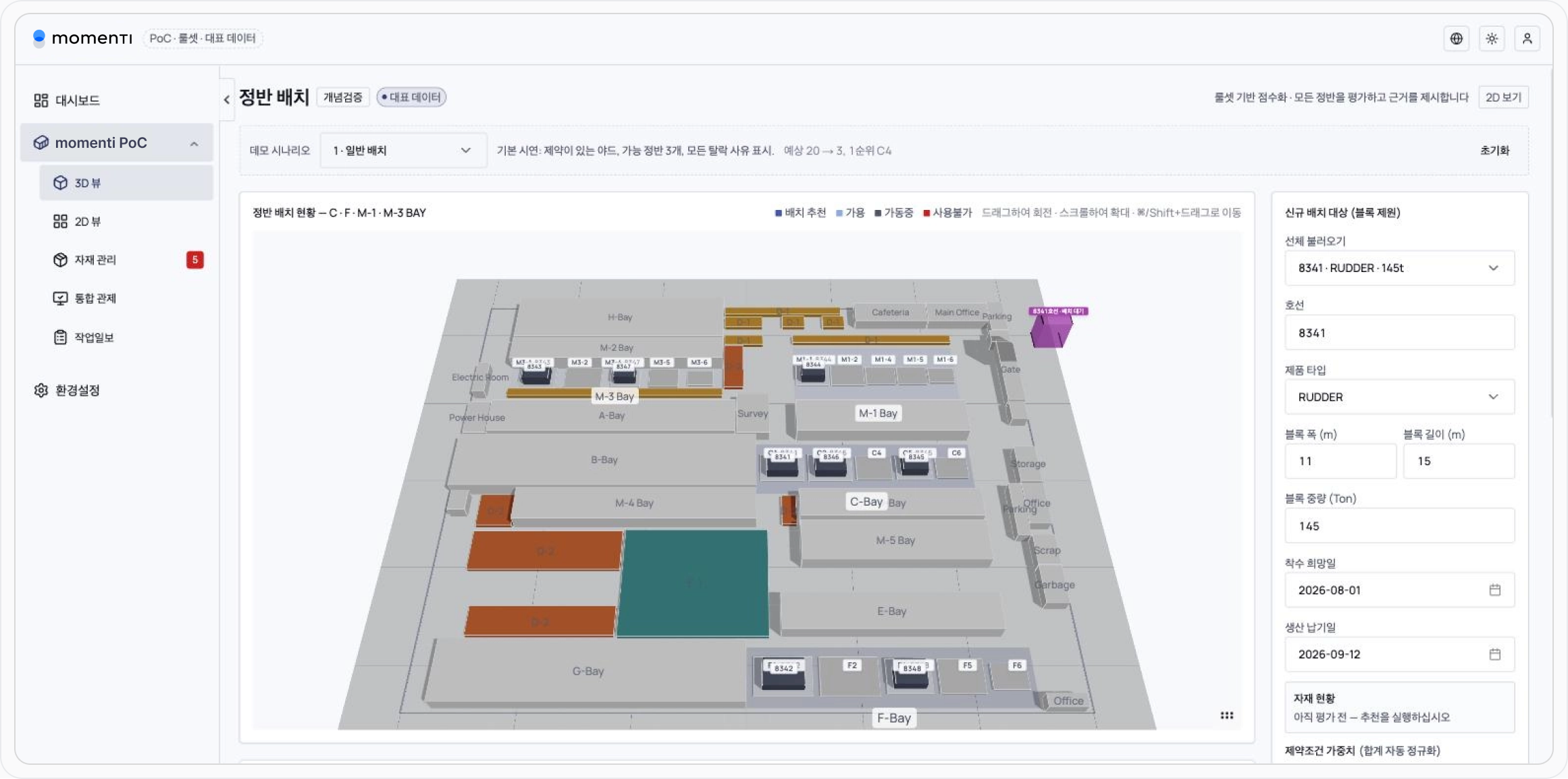
3D yard view
Check bays and platens in 3D — recommended · available · in-use · unavailable, distinguished by status with occupancy schedules

2D view
The same data and rules on a flat screen,
identical results even on low-spec PCs · remote access

Layout records
Records run ID, ruleset, weights, yard state, and evaluation date
so the recommendation grounds can be re-checked

Materials management
Order · receipt quantity, receipt rate, expected date, storage location
automatically reflected in the recommendation engine's metrics

Plan integrity check
Catches hard-to-execute plans before on-site work begins

Structured work logs
Structures hull · dept · item · process · partner · labor input
edits are kept as revisions, never overwritten
Suitable for environments like these
1. Shipbuilding · heavy-industry sites that must efficiently arrange limited space like platens · bays · workshops
2. Organizations where layout standards and know-how are concentrated in specific people
3. Sites that discover planning conflicts late, during actual work
4. Organizations coordinating production plans mainly through Excel and verbal handoff
Existing approach vs Momenti approach
Momenti integrated control — where judgments stay on record
Existing approach
Layout standards live in a person's experience and Excel
Whenever conditions change, someone re-checks them by hand
Only the recommendation remains — not the reasons for exclusion
When the owner changes, the judgment criteria disappear too
Momenti approach
Automatically evaluates every platen by the same standard
Excluded platens are kept with their reasons, not deleted
Records run ID · ruleset · weights · yard state together
Later the original conditions can be reloaded to re-verify grounds
Layout recommendation evaluation flow
The evaluation flow records excluded candidates and their reasons as well.
Step 1.
Block · yard info
Size · weight · schedule, material receipt · delivery
Step 2.
Required-condition filter
Size · weight · crane capacity, existing occupancy · allowed products
Step 3.
Excluded platens · reasons
Insufficient size, crane capacity exceeded, hull already in use
Step 4.
Candidate scoring
Size · load / schedule · delivery, material receipt / type · flow
Step 5.
Top-candidate proposal
Proposes top candidates + final review by the owner
Step 6.
Execution history record
Run ID, ruleset, weights, yard state, evaluation date, materials status at the time
* Only candidates that pass the conditions are scored, and excluded platens are also shown on screen with their reasons.
Plan integrity check — 5 types
The plan integrity check verifies hard-to-execute plans before on-site work begins.
Full process plan input
1. Sequence reversal
A successor process starts before its predecessor
2. Resource conflict
The same resource is assigned to two places at once
3. Due-date overrun
The plan end date falls after the due date
4. Out of plan window
A schedule that falls outside the overall plan period
5. Non-working-day assignment
Work assigned on holidays · non-working days
* If any one of the five types is triggered, it is flagged before execution, reducing cases where conflicts are found late on site.
Conversational market data analysis — Appliance Insights AI
Existing dashboards depend on an analyst or SQL for every new question, and general-purpose AI makes you re-verify the reliability of each answer. Ask without SQL, and check the answer together with the source data behind it.
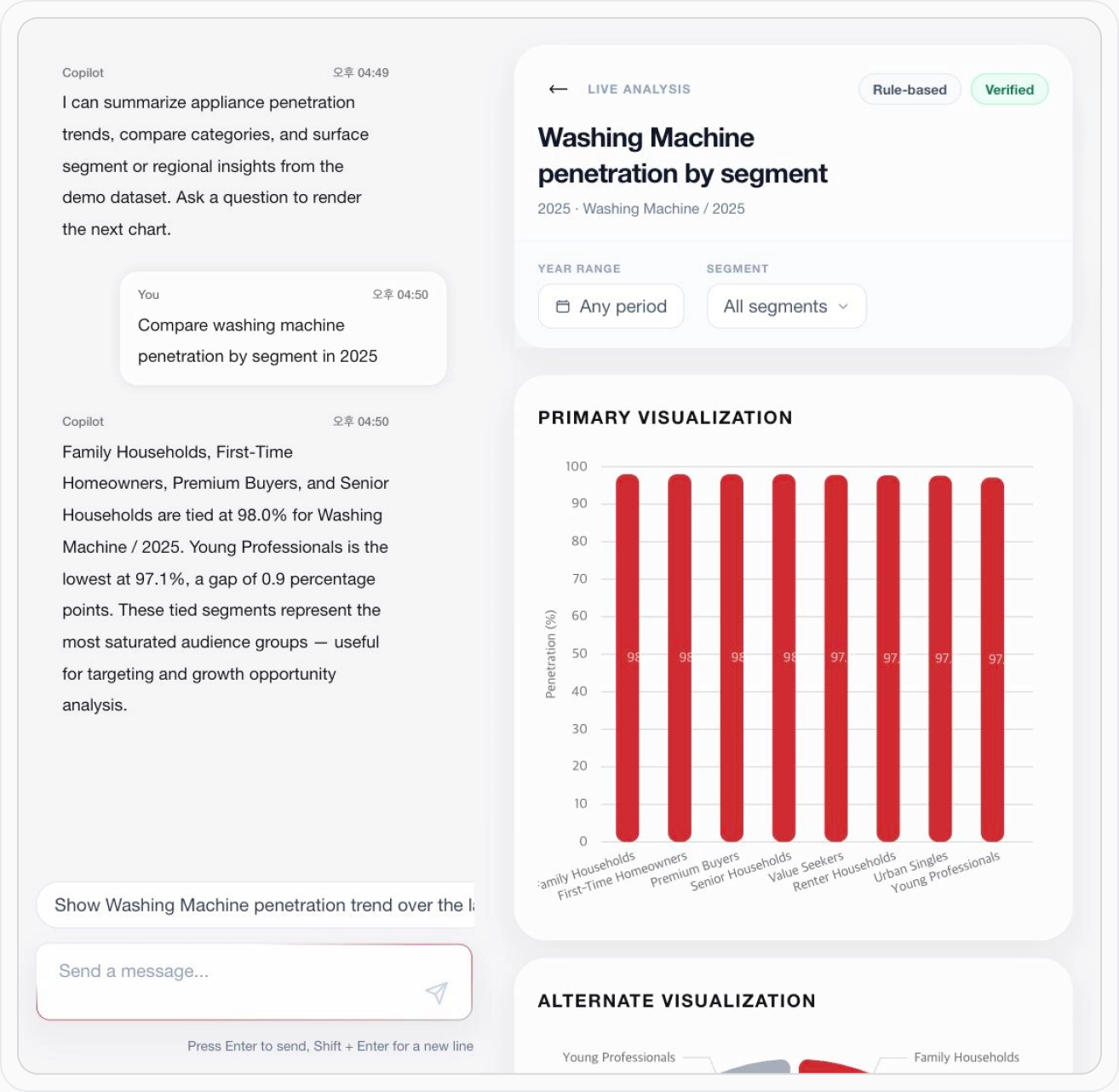
* Built from 2011–2025 home-appliance adoption rates across 16 product categories, 8 consumer segments, and 8 domestic regions.
* This data is synthetic, created for feature validation, and is not real market-research or operational data.
Suitable for environments like these
1. Market-intelligence · insight teams that check data often but find SQL hard to use
2. Organizations that frequently analyze trends by product · region · category
3. Executives and practitioners with many questions fixed dashboards can't answer
4. Organizations that want data self-service without granting direct DB access
Connecting data to general-purpose AI vs Appliance Insights AI
Ask conveniently, answer with verified numbers —
a conversational data-analysis solution
Connecting data to general-purpose AI
The model generates numbers inside sentences
Sources and query scope aren't kept in the answer
To verify, you must query the raw data again
Appliance Insights AI
Separates conversational convenience from data reliability
Shows only values read from an approved read-only area
Labels data source · period · row count · verification status together
INSIGHTS 4 layers
The AI interprets the question and returns verifiable results by querying only approved data.
L1. Interpret
Extracts intent, period, and product · region · segment scope
L2. Execute
Queries data only within a pre-approved read-only analysis area
L3. Display
Shows only actually-queried data on screen, generating no arbitrary values
L4. Verification labels
Shows data source, query period·scope, row count, and verification status together
* For periods or data ranges that can't be queried, it doesn't fabricate an answer — it shows the range currently available.
5-stage query verification before execution
Every query goes through pre-execution verification, and only allowed requests reach the database.
Query candidate
A fixed path or
an AI-generated query

Five gates right before execution
01
Approved-area check
Checks only pre-approved
analysis areas
02
Read-only
SELECT only
allowed
03
Block change commands
Blocks data changes,
system commands
04
Execution limits
Max row count,
run-time limit
05
Least-privilege run
Runs on a least-privilege
DB account
Database
Read-only
* Clear questions go through fixed query paths, and even when the AI proposes a query, only queries that pass the same verification are executed.
6-step analysis process
It interprets the question, queries the data, and delivers a verifiable answer.
* Each answer comes with the applied query conditions and the source data, downloadable as CSV so you can verify it yourself.
Query complex management data in natural language
and see results right away — Management Intelligence AI
You don't have to check data scattered across ERP, business plans, and BI dashboards one by one.
Ask in natural language and it queries · analyzes the data you need, returning verifiable results based on the metrics and calculation standards your company defines.
Key features

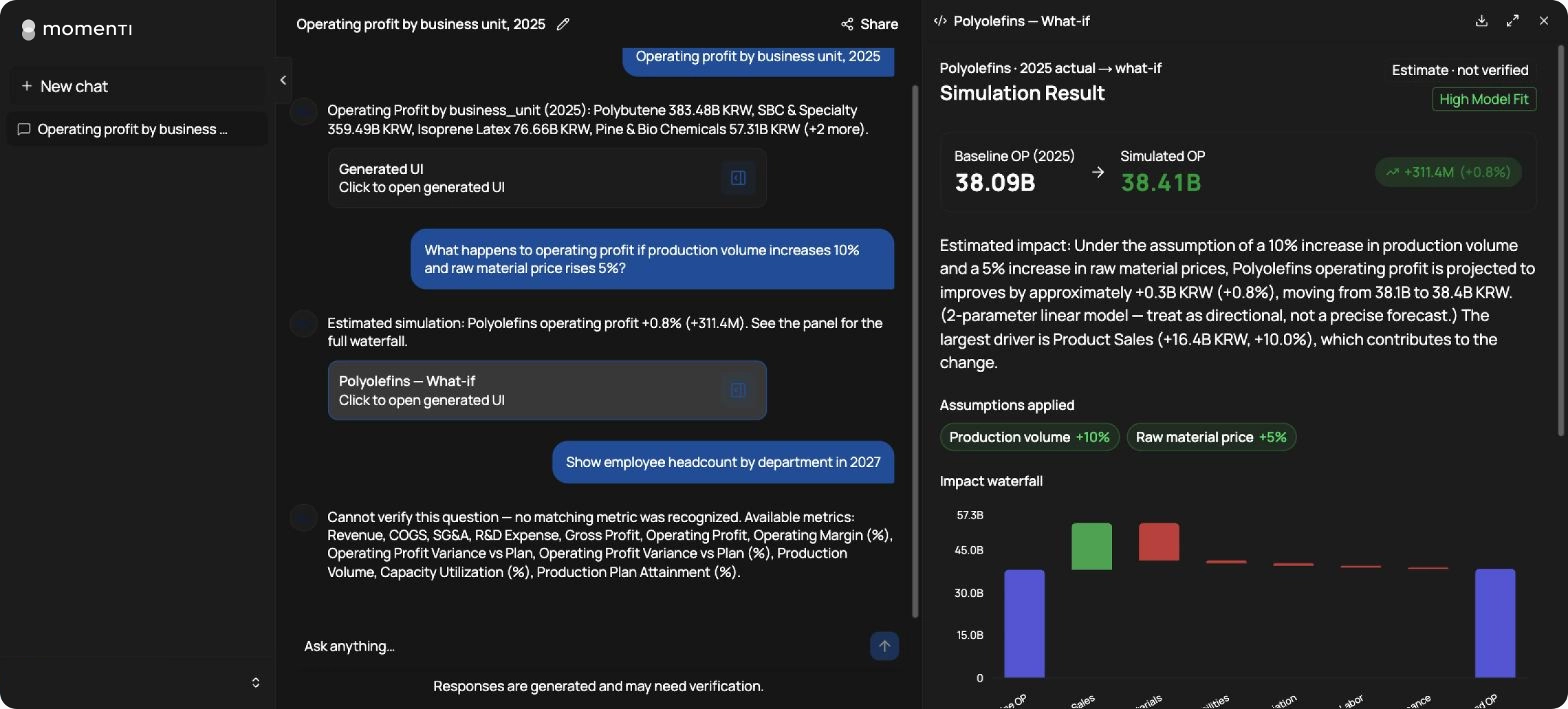
Management Q&A
Provides summaries · charts · detailed data for questions,
shown with verification status and data source

Term mapping
Maps user wording to official metrics and conditions
so everything is read by the same standard

Executed-SQL disclosure
Discloses the actual SQL and query conditions run
so you can check the analysis basis directly

Assumption-based simulation
Analyzes the impact of changing conditions on charts
with prediction ranges and uncertainty

Catalog management
Manages standards — metrics · synonyms · units —
while keeping calculation logic separately protected

AI-assistant integration
Via MCP, in-house AI uses the same analysis engine
and calculation standards
Suitable for environments like these
1. Executives and finance teams who want management figures fast, in natural language
2. Business analysts who want to reduce repetitive data-extraction work
3. Data teams that must offer safe data self-service without direct DB access
4. Manufacturers that frequently compare plan · actual · forecast · production plans
5. Companies already running an in-house LLM or AI assistant
General LLM vs Momenti Management Intelligence AI
How a general LLM and Management Intelligence AI differ
The LLM handles both metric meaning and SQL
Calculation standards can change with each question
The same metric can be computed under a different definition
Finance staff can't easily check how the result was computed
Momenti Management Intelligence AI
Separates language understanding from actual number calculation
Official metric definitions are managed by a semantic catalog
SQL is generated deterministically by defined rules
Management Intelligence AI — 4-layer structure
From interpreting the question to calculation and verification, roles are separated to deliver consistent, verifiable results.
L1. Interpret
Grasps the question's intent, period, and conditions like division · product
L2. Define
Manages analysis standards — official metrics, terms, units, allowed ranges
L3. Calculate
Generates · runs queries by defined standards and computes the needed data
L4. Verify · disclose
Shows only verified results, with the queries and metric standards used
* Analysis standards like metric names, synonyms, and units can be managed, but calculation logic that affects official figures is kept separate so it isn't changed arbitrarily during operation.
5-stage verification pipeline
Only results that pass all five verification stages are shown on screen; results that don't meet the criteria are not provided to the user.
V1
Safety check
Query safety and
access-permission check
V2
Catalog definition
Checks match with official metric
definitions and calc standards
V3
Question-match check
Checks the result matches
the user's question
V4
Result validity
Checks value ranges
and anomalies
V5
Cross-check
Compares · verifies against
another query path's result
Verification complete
Only passing results shown
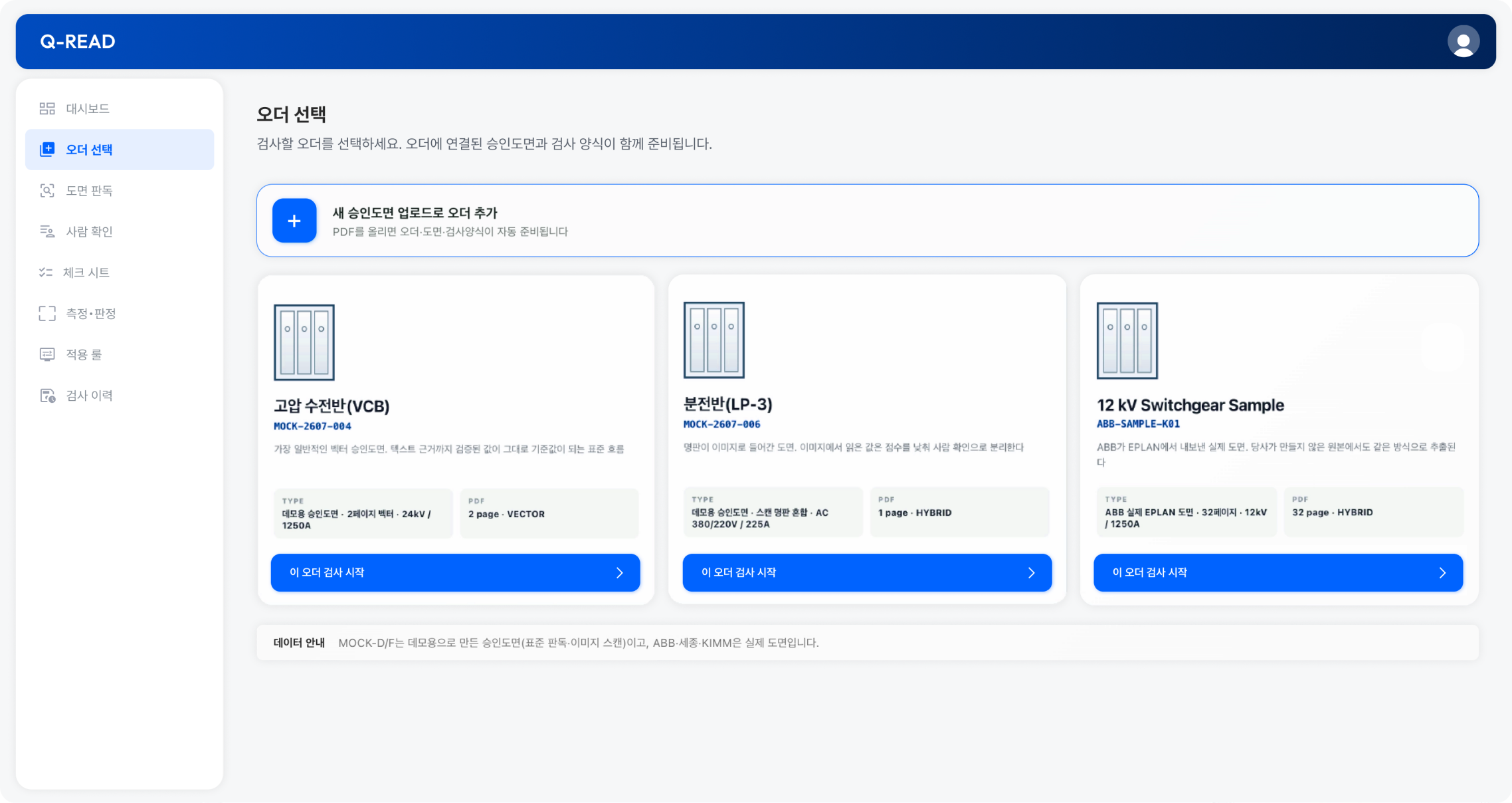
Drawing-based inspection automation
for heavy-electric manufacturers — Q-READ
Q-READ can be set up on-premise with Docker Compose,
and supports a configuration that runs without an internet connection in operation.
Key features

Drawing-based auto inspection
Pre-verifies threshold values like rated
voltage, rated current, short-circuit current

AI auto reading & extraction
Auto-extracts values and info from
vector text · scanned images

Auto judgment & approval
Judges automatically on evidence
and confirms with owner approval

Inspection history
Keeps source data, results, and approval
records transparently, with tracing

System integration & scaling
Integrates with existing systems · data
for flexible scaling and automation
Suitable for environments like these
1. Manufacturing sites that build to order · inspect against approved drawings
2. Organizations that must submit the source of figures alongside results
3. Inspection processes with heavy manual entry and re-checking
4. Manufacturing environments where external SaaS · AI use is restricted
Existing approach vs Q-READ
Auto-discovers · extracts scattered standards,
minimizing inspection errors by comparing to the drawing
Existing approach
Scattered across pages · areas
Units and notations vary
Manual-entry errors
Q-READ approach
Auto-discovers · extracts scattered inspection standards
Auto-recognizes varied units and notations
Auto-compares drawing to thresholds, minimizing errors
Q-READ operation process — 6 steps
It handles the whole process, from reading the drawing to recording the inspection.
Step 1. Order Selection | Step 2. AI Drawing Analysis | Step 3. Human Review & Approval | Step 4. Automated Checklist Generation | Step 5. Measurement & Evaluation | Step 6. Inspection Records |
|---|---|---|---|---|---|
| Inspection Order | Vector Text Parsing | Verify Evidence on Drawing | Verify Evidence on Drawing | Rule Engine | File Package |
| Approved Drawing PDF | Scanned Image Analysis Candidate Values | Select / Leave Blank | Drawing · Extractor · Rule Version | PASS / FAIL | Lock Inspection Record |
| Inspection Form | Verify Against Original | Approval Record | Approval Record | Defect Registration | Inspection Report PDF |
Q-READ verification scope
Apply and extract the drawing, then verify
the entire flow from human approval to inspection ruling
Beyond standard vector approved drawings, it applies to drawings that mix different units and notations, drawings that combine vector and scanned content, and real-world third-party CAD drawings — verifying the entire flow.
Deployment environment
A configuration you can run in your operating
environment with no internet connection
It can be built on an on-premise Docker Compose setup, and in the operating environment it supports a configuration that runs without an internet connection.
It also manages the duplicate entries and edit conflicts that can arise when working simultaneously from PCs and tablets on the same internal network.
Summary
PoC at a glance
Compare the role the AI plays, the engine that performs the actual
calculation and ruling, and how each result is verified.
| PoC | Domain | AI's role | Actual calculation & ruling | Result verification |
|---|---|---|---|---|
| Momenti AICC | Contact center | Consultation support & exception-range analysis | Rule engine | KB source text & actual utterances |
| Plate layout optimization | Shipbuilding · heavy industry | Explains candidates & layout results | Layout ruleset | Recommendation · exclusion reasons & execution history |
| Appliance Insights AI | Market · consumer analysis | Interprets questions & writes insights | Approved data lookup | Source data & CSV |
| Business Intelligence AI | Management · finance analysis | Maps questions to internal metrics | Deterministic SQL · simulation engine | Term mapping, SQL & verification results |
| Q-READ | Manufacturing inspection | Interprets drawings & extracts candidate reference values | Rule engine | Drawing source location & inspection history |
Process
You can start with the data you already have —
no fully built data environment required
Starting from the real work materials you already have, you can begin with a small-scope PoC to confirm its impact, then expand step by step to a real operating environment based on the verification results.
Step 1
Identify the target
Review your data and work standards to
separate the areas to apply from those
that need extra definition.
Step 2
Verify the feasible scope
Based on real data and field questions,
confirm what can be processed
and what needs to be supplemented.
Step 3
Custom PoC & operational rollout
Reflecting your work environment and data
integration scope, build the PoC and draw up
a phased adoption plan.
* You can start using only the materials you already have — drawings, work forms, policy documents, datasets, field questions, and more.

We separate where AI interprets & proposes, where rule and
optimization engines calculate & judge, and where people confirm
With just a few of the drawings, work forms, policy documents, datasets, and field questions you already use, we can check what's feasible first.